

Using a standing desk can boost your focus, reduce discomfort, and increase productivity by encouraging better posture and movement. Standing promotes muscle engagement and alertness, which may lead to clearer thinking and faster work. However, long periods standing without shifting can cause fatigue, so alternating between sitting and standing is key. Proper ergonomic setup guarantees comfort and supports natural alignment. Keep exploring to discover how these adjustments can truly enhance your work output.

Get business pricing on tech for your team
- Business-only prices and quantity discounts
- Tax-exempt purchasing
- Multiple users, one account, clear invoices
Key Takeaways
- Standing desks promote alertness and focus, potentially increasing work productivity.
- Alternating between sitting and standing prevents fatigue, maintaining consistent output.
- Proper ergonomic adjustments improve comfort, reducing distractions and enhancing task efficiency.
- Standing encourages muscle engagement, which can boost energy levels during work hours.
- Long-term benefits include reduced discomfort and improved posture, supporting sustained work performance.
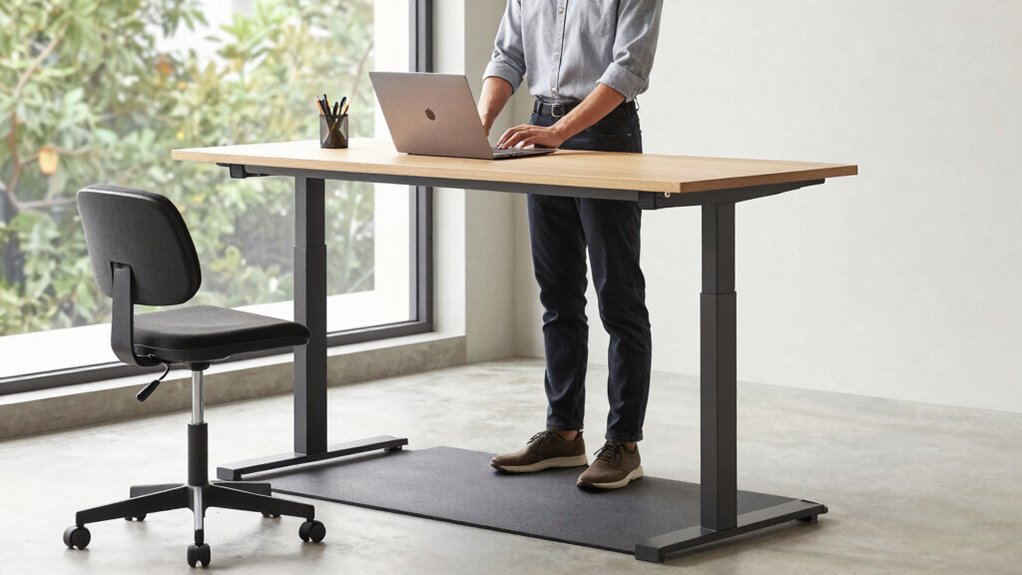
Have you ever wondered if standing desks could actually improve your health and productivity? The idea sounds promising—standing instead of sitting for hours at a time might seem like a simple way to boost your energy and focus. But to truly reap those benefits, proper ergonomic adjustments are essential. When you set up your standing desk correctly, you ensure that your workstation supports your body’s natural alignment. Adjust the height so that your elbows are bent at about a 90-degree angle, and your wrists remain straight while typing. Your monitor should be positioned so that the top of the screen is at eye level, preventing you from craning your neck downward or upward. These ergonomic adjustments aren’t just about comfort; they play a crucial role in posture improvement. When your workspace encourages good posture, you reduce strain on your neck, shoulders, and back, which can lead to fewer aches and pains over time.
As you adopt a standing desk, you might notice an immediate shift in how you feel. Standing encourages more active engagement of your muscles, which can help you stay alert and prevent the sluggishness that sometimes accompanies prolonged sitting. However, standing for long periods without movement can be just as harmful as sitting. That’s why alternating between sitting and standing, along with periodic movement, is key. Incorporating ergonomic adjustments into your routine helps you find that balance, making standing work more sustainable and comfortable. It also fosters better posture improvement because you’re less likely to slump or hunch over your keyboard when your desk setup supports proper alignment. Additionally, understanding the importance of ergonomic positioning can help you customize your workspace to maximize comfort and reduce strain. Proper posture not only alleviates discomfort but also enhances overall productivity by keeping you focused and energized. Developing awareness of ergonomic principles can further aid in maintaining a healthy workspace environment.
You might initially feel awkward standing all day, but as you get used to it, you’ll likely notice a difference in your overall energy levels. The main promise of a standing desk is not only about reducing the physical toll of sitting but also about enhancing your output. When your body is properly supported through ergonomic adjustments, you can focus more on your tasks rather than discomfort. Over time, improved posture reduces fatigue and the risk of developing chronic pain, thereby enabling you to work more efficiently. Maintaining awareness of ergonomic best practices can help you adapt your workspace as your needs change. Ultimately, standing desks hold potential, but only if you set them up correctly and make mindful adjustments. When you prioritize ergonomic positioning and posture improvement, you unlock the true benefits of working upright—more comfort, better health, and possibly, higher productivity.
As an affiliate, we earn on qualifying purchases.
Frequently Asked Questions
How Long Should I Stand at My Desk Each Day?
You should aim to stand at your desk for about 2 to 4 hours daily, breaking it into intervals to avoid fatigue. Adjust your desk height to guarantee ergonomic accessories, like a footrest or anti-fatigue mat, support comfort. Incorporate sitting periods and switch between sitting and standing to maintain productivity and prevent strain, making sure your workspace setup encourages proper posture for overall well-being.
Can Standing Desks Reduce Back Pain Effectively?
Standing desks can effectively reduce back pain, with studies showing a 32% improvement in discomfort. By making ergonomic adjustments, you promote better posture benefits and reduce strain on your lower back. Standing encourages movement and helps align your spine properly. Keep in mind, warming up your muscles and switching between sitting and standing throughout the day maximizes these benefits, preventing new aches and ensuring long-term relief.
Are There Health Risks Associated With Prolonged Standing?
Prolonged standing can pose health risks like joint strain, varicose veins, and fatigue. To minimize these issues, you should use ergonomic accessories such as anti-fatigue mats and supportive footwear, which improve comfort. Additionally, regularly shifting positions and taking breaks boost blood circulation, reducing discomfort and health risks. You’re better off balancing standing with sitting to maintain your overall well-being during long work hours.
What Types of Work Are Best Suited for Standing Desks?
You’re best suited for standing desks when your tasks involve frequent computer use, writing, or light assembly work. To optimize your experience, use ergonomic accessories like a supportive mat, monitor risers, or keyboard trays, and make regular posture adjustments. These tools help prevent strain, encourage proper alignment, and keep you comfortable during extended periods of standing, boosting productivity and reducing fatigue.
How Do I Transition Smoothly to a Standing Desk Routine?
Think of your shift like climbing a gentle hill—gradually get used to it. Start by adjusting your desk height and using ergonomic accessories to support comfort. Begin with short standing intervals, maybe 15-20 minutes, then slowly increase. Listen to your body, take breaks, and stay mindful of posture. This slow, steady approach helps your muscles adapt without strain, making standing a natural part of your routine.
As an affiliate, we earn on qualifying purchases.
Conclusion
So, next time you consider switching to a standing desk, remember that while it may boost your energy and reduce some aches, your productivity isn’t guaranteed. Notably, a study found that workers who stand more often see a 10% increase in focus and efficiency. So, give standing desks a try, but don’t expect a miracle—mixing sitting and standing might just be the best way to keep your output steady and your day balanced.
desk height ergonomic adjustment
As an affiliate, we earn on qualifying purchases.
As an affiliate, we earn on qualifying purchases.
As an affiliate, we earn on qualifying purchases.
Fall Picks
fall essentials
As an affiliate, we earn on qualifying purchases.